The WireGuard tunnel is up. The handshake is recent, ping works, and some websites load fine. Others hang forever on a blank page. Large downloads start and then stall. SSH connects, but copying a file over it freezes.
When a WireGuard tunnel works for small things and fails for big ones, the cause is almost always the MTU: packets are too large for some part of the path, and they're being dropped without anyone being told.
This guide explains why that happens, how to find the right MTU for your network, and how to fix it on the client and the server so it stays fixed.
What MTU is, and why WireGuard makes it matter
MTU (maximum transmission unit) is the largest packet a network link will carry in one piece. On most Ethernet networks it's 1500 bytes.
WireGuard wraps every packet inside a new UDP packet, and that wrapper takes space:
| Part | IPv4 path | IPv6 path |
|---|---|---|
| Outer IP header | 20 bytes | 40 bytes |
| UDP header | 8 bytes | 8 bytes |
| WireGuard header and auth tag | 32 bytes | 32 bytes |
| Total overhead | 60 bytes | 80 bytes |
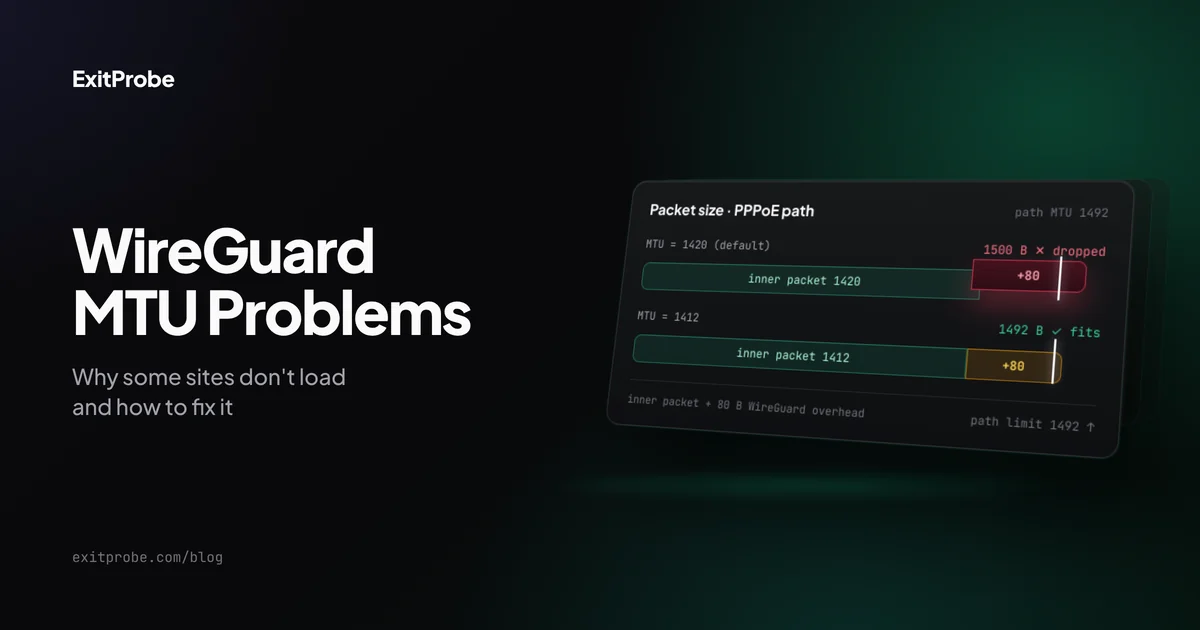
So on a 1500-byte link, the largest packet that fits inside the tunnel is 1440 bytes over IPv4 and 1420 over IPv6. That's where WireGuard's usual default of 1420 comes from: 1500 minus the worst case of 80.
The problem is that many paths are smaller than 1500:
- PPPoE (common on DSL and fiber home internet): 1492
- Google Cloud VPC networks: 1460 by default
- Mobile networks, and connections that already go through another tunnel or VPN: often lower, and it varies by carrier
On a 1492-byte PPPoE link, a 1420-byte inner packet becomes 1500 bytes once WireGuard wraps it. That's 8 bytes too big.
Why some sites load and others don't
If a packet is too big, the network is supposed to send back an ICMP "fragmentation needed" message (or "packet too big" for IPv6), and the sender then uses smaller packets. This is called path MTU discovery.
In practice, many firewalls and some networks drop those ICMP messages. The large packet disappears, no error comes back, and the connection just waits. This is called a PMTU black hole, and it explains every typical symptom:
- Ping works, because ping packets are small.
- The handshake works, because handshake messages are small.
- Some sites load, usually when the server sends small packets or handles MTU problems well.
- Other sites hang, often during the TLS handshake, because certificates make those packets large.
- Large downloads stall after starting, once full-size packets begin to flow.
If your users describe "connected, but only some things work", check MTU before anything else. Problems like DNS or broken forwarding usually break everything, not just some sites. We cover those in why ping works but your VPN doesn't.
How to find the right MTU
The idea is to find the largest packet that crosses the real path without being fragmented, then subtract WireGuard's overhead.
1. Measure the path MTU outside the tunnel
Turn WireGuard off on the client, then ping the server's public IP with "don't fragment" set. Start at 1472 bytes of data, which plus 28 bytes of ICMP and IP headers makes a full 1500-byte packet.
On Linux:
ping -M do -s 1472 -c 3 203.0.113.10
On Windows:
ping -f -l 1472 203.0.113.10
On macOS:
ping -D -s 1472 -c 3 203.0.113.10
If it fails, with "Frag needed", "message too long", "Packet needs to be fragmented" or just no reply, lower the size and try again, for example 1464, 1452, 1432. When it works, add 28 to the size. That's your path MTU.
For example, if 1464 works and 1472 doesn't, the path MTU is 1492, which is what PPPoE gives you.
2. Calculate the WireGuard MTU
Subtract WireGuard's overhead from the path MTU:
- Path MTU 1492, IPv6 endpoint or unsure: 1492 − 80 = 1412
- Path MTU 1492, IPv4 only: 1492 − 60 = 1432
- Path MTU 1460 (Google Cloud): 1460 − 80 = 1380
If you're not sure whether clients reach the server over IPv4 or IPv6, subtract 80. A slightly smaller MTU costs very little speed. A too-large one breaks connections.
3. Confirm through the tunnel
Turn WireGuard back on with the new MTU and ping the server's tunnel address with a full-size packet. Inner packet size = MTU − 28:
ping -M do -s 1384 -c 3 10.8.0.1
That's for an MTU of 1412. Then do the real test: load the sites that used to hang and download a large file through the tunnel.
How to set the MTU
On the client
Add MTU to the [Interface] section of the client config:
[Interface]
PrivateKey = ...
Address = 10.8.0.2/32
DNS = 10.8.0.1
MTU = 1412
Most WireGuard apps, including the official Windows, macOS, iOS and Android clients, read this line. Some router firmware has its own MTU field in the WireGuard settings instead.
On the server
MTU applies to packets a side sends. Fixing the client only fixes uploads. Downloads come from the server, so the server needs a fitting MTU as well:
[Interface]
Address = 10.8.0.1/24
ListenPort = 51820
PrivateKey = ...
MTU = 1412
With wg-quick, the change applies after wg-quick down wg0 && wg-quick up wg0. You can check the active value with:
ip link show wg0
A VPN server has one MTU per interface but serves clients on many different networks. Setting it low enough for the worst client makes everyone a bit slower, and you never know the worst one in advance. That's why the next step matters more for providers.
Clamp TCP MSS on the server
MSS clamping makes TCP connections agree on a segment size that fits the tunnel, during the connection setup itself. It fixes most TCP problems without anyone needing to know their path MTU.
With iptables:
iptables -t mangle -A FORWARD -p tcp --tcp-flags SYN,RST SYN -j TCPMSS --clamp-mss-to-pmtu
With nftables, in a forward chain:
tcp flags syn tcp option maxseg size set rt mtu
Add it to your PostUp (and the matching delete to PostDown) so it survives restarts. Clamping only helps TCP. UDP traffic, including QUIC and HTTP/3, still depends on the MTU itself.
Don't block ICMP "fragmentation needed"
Path MTU discovery only works if the ICMP messages that report "too big" can get through. If your server's firewall drops all ICMP, allow at least:
- ICMPv4 type 3, code 4 (fragmentation needed)
- ICMPv6 type 2 (packet too big)
Blocking these is one of the most common reasons MTU problems happen at all.
Common mistakes
- Setting the MTU too low. Going below 1280 breaks IPv6 inside the tunnel, because IPv6 requires links of at least 1280 bytes. QUIC also needs room for packets of at least 1200 bytes. Stay at or above 1280.
- Only changing the client. Uploads get fixed, downloads still hang.
- Testing with ping only. Ping uses small packets by default. Always test with full-size packets and a real download.
- Forgetting nested tunnels. WireGuard running over another VPN, over Docker or Kubernetes overlay networks, or over cloud networks with smaller MTUs loses more room with each layer. Measure the real path.
- Changing the MTU on a live fleet without testing. A new default affects every user on every network at once. Roll it out to one server first.
Catching MTU problems before users report them
MTU problems are easy to miss with ordinary monitoring. A ping succeeds. A port check succeeds. Even a check that brings up the tunnel and fetches a small page can succeed, while users on PPPoE or mobile networks can't load half their sites.
Two habits help:
- After any network change, such as a new hosting provider, a new cloud region, a firewall change or a new default MTU, test with a large download through the tunnel, not just a ping.
- Watch for tickets that say "some sites don't load" or "downloads stall". Those almost never come from a server that's down. They point to packet size.
For the problems that do take a server down, like a handshake that stops working, a wrong exit IP or a block in one region, ExitProbe runs a real WireGuard tunnel from probes in multiple regions on every check and verifies the handshake, exit IP and latency. If the handshake itself is what's failing, see WireGuard handshake not working.
For the bigger picture, see our complete guide to VPN server monitoring.
Frequently asked questions
What is the best MTU for WireGuard?
There's no single best value. 1420 works on standard 1500-byte networks. On PPPoE use about 1412, and on Google Cloud about 1380. Measure your path MTU with a don't-fragment ping and subtract 80 bytes.
Why do some websites not load over WireGuard?
Usually because the MTU is too large for part of the path and the "packet too big" messages are blocked. Small packets get through, so ping and some sites work, while large packets, often during the TLS handshake, are silently dropped.
Do I need to set the MTU on both the client and the server?
Yes. MTU only limits the packets each side sends. The client's MTU fixes uploads, and the server's MTU, or MSS clamping on the server, fixes downloads.
Can the WireGuard MTU be too low?
Yes. Below 1280, IPv6 inside the tunnel stops working, and you lose speed to extra packets. Keep it at 1280 or above.
Find out about broken WireGuard servers before your users do. Start free with ExitProbe and run real WireGuard checks from multiple regions.
Add a server as a monitor and ExitProbe runs the full session from outside, then verifies the exit IP.