A WireGuard client says it's connected, but nothing loads. You check the server with wg show and the peer's "latest handshake" line is missing, or hours old. On the client side, the log keeps repeating the same line:
Handshake for peer 1 (203.0.113.10:51820) did not complete after 5 seconds, retrying (try 2)
When the WireGuard handshake is not working, the tunnel can't carry a single packet. The good news is that the list of causes is short, and one quick test tells you which half of the list to look at.
This guide covers that test, the 9 most common causes with a command to check each one, what to do when the handshake works but traffic still doesn't, and how to catch handshake failures before your users do.
Why WireGuard handshake problems are hard to see
Most VPN protocols complain when something is wrong. OpenVPN logs a TLS error. IPsec logs a failed negotiation. WireGuard, by design, stays silent. If a server receives a handshake packet it can't authenticate, it drops it and sends nothing back. No error, no rejection, no log line by default.
That's good for security, since a scanner can't even tell a WireGuard server is there. It's bad for troubleshooting, because a wrong key, a closed firewall port and a dead server all look exactly the same from the client: silence, then "retrying".
It's also why a UDP port check is useless here. We cover that in more detail in why ping and port checks miss real VPN outages.
First, split the problem in two
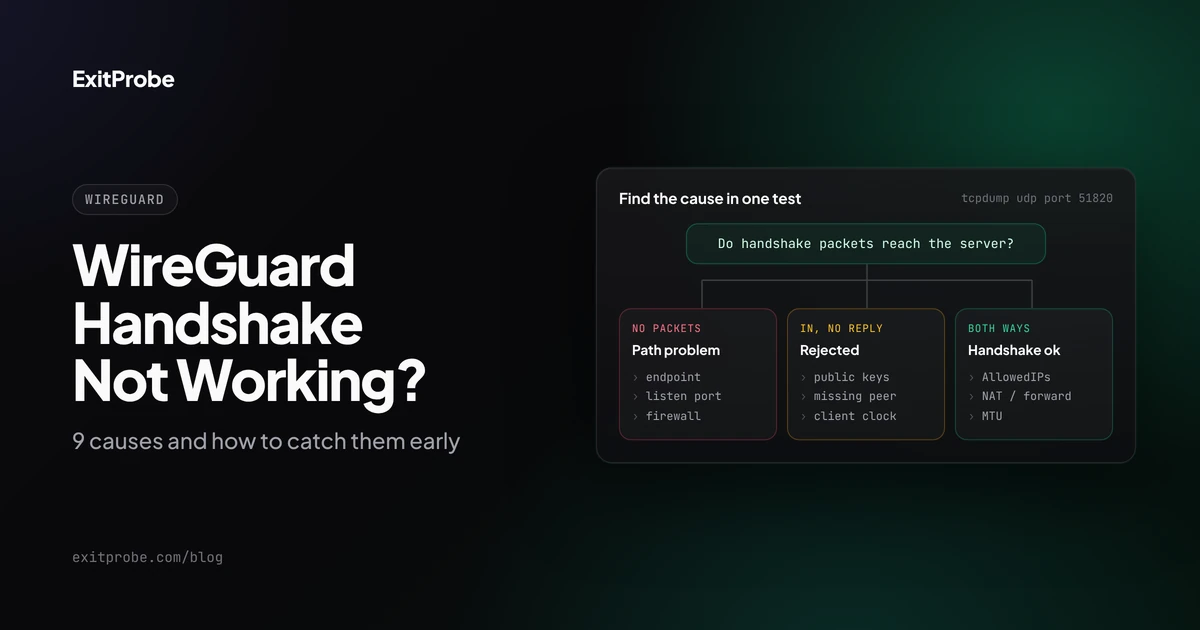
Before changing any config, find out whether the client's handshake packets are reaching the server at all. On the server, run:
tcpdump -ni any udp port 51820
Use your real listen port if it isn't 51820. Then try to connect from the client and watch the output.
- No packets arrive: the problem is on the path. Wrong endpoint, wrong port, a firewall, or a network blocking UDP. Look at causes 3 to 5 and 9.
- Packets arrive, but the server never replies: the packets are reaching WireGuard, and WireGuard is rejecting them. That almost always means keys, peer config or the client's clock. Look at causes 1, 2, 7 and 8.
- Packets go both ways but the connection drops after a while: look at cause 6, NAT without keepalive.
This one test usually cuts troubleshooting time in half.
9 causes of a WireGuard handshake not completing
1. The public keys are swapped or wrong
Every WireGuard config needs two keys from two different machines. The client's [Peer] PublicKey must be the server's public key, and the server's [Peer] PublicKey for that client must be the client's public key. Pasting the wrong one, or a private key where a public key belongs, is the single most common mistake.
Compare what each side actually has. On the server:
wg show wg0 public-key
On the client, derive the public key from the private key in its config:
echo "<client-private-key>" | wg pubkey
The server's public key must match the client's [Peer] PublicKey, and the client's derived key must appear as a peer on the server.
2. The peer isn't on the server, or the server key changed
If a client was never added to the server, or was added to the config file but the interface wasn't reloaded, the server has no way to authenticate it. Check that the peer is really loaded:
wg show wg0 peers
A related case: someone regenerated the server's private key during a rebuild or migration. Every existing client still has the old public key, so every handshake fails at once. If all clients on a node broke at the same moment, check this first.
3. The endpoint is wrong or stale
The client's Endpoint must point to the server's current public IP and port. Two things go wrong here:
- The server moved to a new IP and clients still have the old one.
- The endpoint is a hostname. WireGuard resolves it once, when the interface comes up, and doesn't look it up again. If the DNS record changes later, the client keeps sending to the old address until the tunnel is restarted.
4. The listen port changed after a restart
If the server config has no ListenPort line, WireGuard picks a random port every time the interface starts. Everything works until the next reboot, then every client is sending to a port nobody listens on. Always set ListenPort explicitly on servers, and confirm the port with:
wg show wg0 listen-port
5. A firewall is blocking the UDP port
The port needs to be open in every layer between the client and WireGuard: the server's own firewall (ufw, iptables or nftables) and any cloud firewall or security group in front of it. People often open one and forget the other. If tcpdump shows nothing arriving, check both.
ufw status
iptables -L INPUT -n -v | grep 51820
6. NAT drops the connection without keepalive
When a client sits behind NAT, which is almost every phone and home router, the NAT device forgets the mapping after a period of silence. The tunnel works, goes quiet, and then the server can't reach the client anymore. To the user it looks like the VPN randomly stops working.
Set this in the client's [Peer] section:
PersistentKeepalive = 25
It sends a small packet every 25 seconds so the NAT mapping stays open.
7. The client's clock jumped backwards
Each handshake initiation carries a timestamp, and a server ignores any initiation from a peer that isn't newer than the last one it accepted from that peer. This stops replay attacks. It also means that if a client's clock jumps backwards, for example a router or small device without a battery-backed clock that boots with the wrong date, its handshakes are silently ignored until the clock catches up.
Fix the time on the client (enable NTP). If you need the peer back right away, removing and re-adding it on the server, or restarting the server interface, clears the stored timestamp.
8. The same config is used on two devices
If one client config is copied to a laptop and a phone, both devices share one key. The server sees one peer jumping between two addresses, and the two devices keep knocking each other off. Symptoms are a connection that works on one device until the other comes online. Every device needs its own key pair and its own peer entry.
9. The network blocks UDP or WireGuard itself
Some networks block UDP entirely or throttle it hard: certain corporate networks, hotel and airport Wi-Fi, and some mobile carriers. In some countries, WireGuard traffic is detected and blocked on purpose. In these cases the server is fine and the config is fine. The handshake fails only from specific networks or regions.
You'll only see this by testing from those networks. A check from your own data center will always pass.
The handshake works, but there's still no traffic
If wg show shows a recent handshake but users still can't browse, the handshake isn't the problem anymore. The usual suspects:
- AllowedIPs on the server. Each client's peer entry needs its tunnel address (for example
10.0.0.2/32). The same address on two peers is a problem too: WireGuard moves the route to whichever peer was added last. - IP forwarding or NAT on the server is off or missing, so traffic enters the tunnel but never reaches the internet.
- MTU. Small packets pass, large ones get dropped, and pages hang halfway through loading.
We walk through each of these, with commands, in why ping works but your VPN doesn't.
Catching handshake failures before users do
Checking wg show by hand works during an incident. It doesn't tell you about the node that broke at 3 a.m., or the one that only fails from one country. Watching handshake timestamps on the server has limits too: it only tells you about clients that tried to connect, and it can't tell a broken node apart from a quiet one.
A better signal is a test client that does a real WireGuard handshake against every node on a schedule, from several regions, then sends traffic through the tunnel and checks the exit IP. If the handshake fails, you know before the first ticket comes in, and you know which node and which region.
That's what ExitProbe's WireGuard monitoring does. You paste a client config, pick the probe locations, and ExitProbe brings up a real tunnel on each check, verifying the handshake, exit IP and latency, with leak detection. For networks you can't reach from public cloud regions, you can run a private probe inside them. If you want to catch config mistakes before a server goes live, run the config through our free config inspector first.
For the bigger picture across all protocols, see our complete guide to VPN server monitoring.
Frequently asked questions
What does "handshake did not complete after 5 seconds" mean?
The client sent a handshake initiation and got no response within 5 seconds, so it's trying again. Either the packets aren't reaching the server (endpoint, port, firewall, network) or the server is receiving them and silently rejecting them (keys, peer config, clock). Running tcpdump on the server tells you which.
How do I check if a WireGuard handshake worked?
Run wg show on either side and look at the "latest handshake" line for that peer. If it's missing, no handshake has ever completed. While traffic is flowing, it should never be more than a few minutes old.
Why does WireGuard say connected but nothing works?
WireGuard has no real "connected" state. Many apps show "connected" as soon as the interface is up, even if no handshake has completed. Check the latest handshake time. If it's recent, look at AllowedIPs, forwarding, NAT and MTU instead.
How often does WireGuard do a handshake?
While traffic is flowing, WireGuard starts a new handshake about every two minutes to rotate session keys. With no traffic and no keepalive, there may be no handshake at all, which is normal.
Know about broken handshakes before your users do. Start free with ExitProbe and run real WireGuard checks on your servers.
Add a server as a monitor and ExitProbe runs the full session from outside, then verifies the exit IP.