A VLESS Reality server that stops working rarely tells you why. The client says it's connected, or it times out, and the server log is often empty. Users just report that "the VPN doesn't open anything".
That silence is on purpose. Reality is built to look like an ordinary visit to a real website, so when something is wrong it doesn't throw an obvious error. It quietly behaves like that website instead. This guide explains how that works, then walks through the 9 most common reasons VLESS Reality is not working, with what to check for each.
The examples use Xray-core field names. If you manage servers through a panel such as 3x-ui or Marzban, the same settings are in the inbound's Reality section.
Why a broken Reality setup looks "connected"
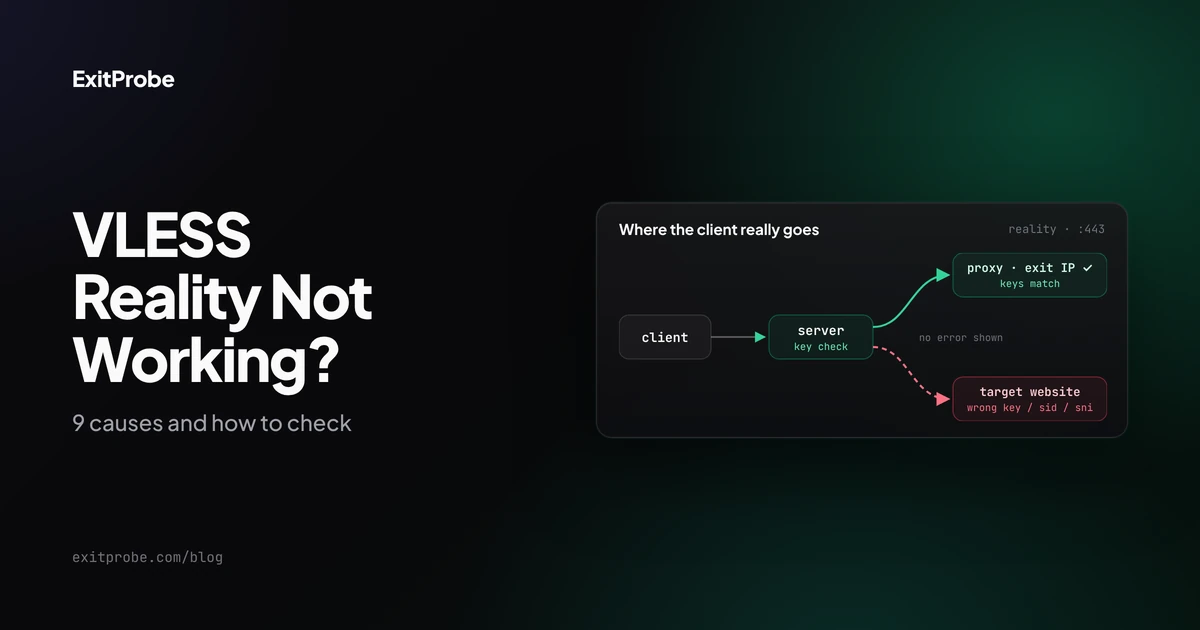
With Reality, the server borrows the TLS handshake of a real site, the target (called dest in older configs). A client that has the right keys passes a hidden check during that handshake and gets the proxy. Anything else, including a scanner or a client with a wrong key, is passed straight through to the real target site.
The Xray documentation describes this directly: traffic that fails authentication is forwarded to the target, for camouflage.
So a client with a wrong public key, short ID or server name doesn't get an error. It gets a real TLS connection to someone else's website. Some apps show "connected", nothing loads, and there's nothing in your proxy logs that looks like a failure. Keep this in mind for causes 2 to 5 below: they all end the same way.
Before you start: test the config and turn on logs
When VLESS Reality is not working, first make sure the server config is valid:
xray run -test -c /usr/local/etc/xray/config.json
Then raise the log level to debug in the log section, and set "show": true in realitySettings to print Reality's own debug output. Restart, watch the log while a client connects, and set both back afterwards:
journalctl -u xray -f
The service name depends on how you installed Xray or which panel you use.
9 reasons VLESS Reality is not working
1. The UUID doesn't match
VLESS authenticates each user with a UUID. If the client's id isn't in the server's clients list, the connection is rejected after the Reality handshake, and the log usually shows invalid request user id. This often happens after a user is deleted and re-created in a panel, which generates a new UUID while the client still has the old link.
Fix: copy the UUID from the server again and update the client, or re-share the full connection link.
2. The public key doesn't belong to the server's private key
The server holds a privateKey. The client needs the matching x25519 public key. In current Xray versions this client field is called password; older versions and many apps still call it publicKey or pbk. If the server key was regenerated, every client breaks at the same moment.
Derive the correct public key from the server's private key:
xray x25519 -i "SERVER_PRIVATE_KEY"
Compare the output with what the client has. If they differ, the client is being sent to the target site instead of the proxy.
3. The short ID isn't on the server's list
The client's shortId must match one entry in the server's shortIds. Each one is hex (0–9, a–f), up to 16 characters, and must have an even number of characters: aa1234 is valid, aaa1234 is not. An empty client short ID only works if the server's list includes "".
4. The server name isn't on the server's list
The client's serverName (SNI) must exactly match one of the server's serverNames. Wildcards like *.example.com are not supported, so www.example.com and example.com are two different entries. A typo here produces the same silent "connected but nothing works" result as a wrong key.
5. The target site is wrong or unreachable
The target is the real site Reality imitates, and the server has to reach it for every handshake. Things that break it:
- The server can't reach the target (DNS problem, firewall on outbound traffic, the site blocks your server's IP range).
- The target doesn't match the server names you use.
- The site changed its setup, its certificate or its TLS support.
Check how the target responds from the server itself:
xray tls ping www.example.com
The Xray docs recommend choosing a target whose certificate and network are close to your server, ideally in the same ASN. A target that's far away or behind a big CDN makes the connection easier to spot and slower.
6. The flow or transport doesn't match
If the server's user entry sets flow to xtls-rprx-vision, the client must set the same flow, and the other way around. Vision also works only with the RAW (TCP) transport, so a client configured for gRPC or XHTTP with Vision enabled will fail. Reality itself supports RAW, XHTTP and gRPC, but the flow and transport have to agree on both sides.
7. Client and server versions don't match
Reality changes over time. Field names have been renamed (dest to target, publicKey to password), and newer cores add features that older clients don't understand. Clients also need a TLS fingerprint set, and the docs only guarantee chrome, firefox and safari.
If one user on an old app can't connect while everyone else can, update the app or its core before changing anything on the server.
8. The clocks are too far apart
The server's realitySettings can include maxTimeDiff, the maximum allowed clock difference between client and server. If you've set it and a client's clock is off by more than that, its handshakes fail. Make sure NTP is running on the server, and check the time on the client device:
timedatectl
9. The server is blocked in some regions
Reality is designed to resist blocking, but it isn't immune. A server can be blocked by IP, by port, or because its target site is itself blocked in a country. When that happens, the server works from most places and fails only from specific countries or mobile networks.
You only see this by testing from inside or near those networks. A check from your own data center will keep passing while users in one region can't connect at all.
If the handshake works but nothing loads
If the server log shows connections being accepted for the right user but pages still don't load, the problem is past Reality. Check that the server's outbound works (DNS, firewall on outgoing traffic, routing rules that block or misroute traffic) and that nothing on the path drops large packets. We cover these checks in why ping works but your VPN doesn't.
How to catch Reality failures early
Most of these problems don't show up as errors. A wrong key looks like a visit to the target site, a blocked region looks fine from everywhere else, and a server with an unreachable target can still answer ping and keep its port open. Uptime checks see nothing.
The reliable signal is a real VLESS Reality client connecting through the tunnel and checking that traffic actually comes out of your server's exit IP, from several regions, on a schedule.
That's what ExitProbe's VLESS Reality monitoring does. You paste the connection URI, choose probe locations, and every check brings up a real Reality tunnel, then verifies the exit IP and latency, with leak detection. Because each probe is checked separately, a server blocked in one country shows up as exactly that.
For the bigger picture across all protocols, see our complete guide to VPN server monitoring.
Frequently asked questions
Why does VLESS Reality say connected but nothing loads?
The most common reason is a mismatch in the Reality settings: wrong public key, short ID or server name. Reality forwards clients that fail its check to the real target site, so the client gets a normal TLS connection to that website instead of your proxy, with no error.
How do I check if my VLESS Reality keys are correct?
Run xray x25519 -i "SERVER_PRIVATE_KEY" on the server. The public key it prints must match the client's password (or publicKey / pbk in older apps) exactly.
What should I use as the Reality target?
A real website that supports modern TLS and is close to your server, ideally hosted in the same network (ASN). Check it with xray tls ping, and make sure the client's server name is in the server's serverNames list.
Does VLESS Reality work everywhere?
No protocol works everywhere all the time. Reality is harder to detect than most, but servers can still be blocked by IP, port or target site in some countries. Test from the regions your users are in.
Find out about broken Reality servers before your users do. Start free with ExitProbe and run real VLESS Reality checks on your servers.
Add a server as a monitor and ExitProbe runs the full session from outside, then verifies the exit IP.